Packaging and Publishing Prefabs
Packaging and publishing determine how a Prefab is prepared, validated, shared, and managed throughout its lifecycle. These steps define how a Prefab is structured, tested, distributed, and updated across WaveMaker projects.
Proper packaging ensures that all required configurations, dependencies, and UI assets are bundled together in a consistent and predictable manner. Publishing then controls the visibility and availability of the Prefab—whether it is limited to a single project, shared within a team, or distributed more broadly across the enterprise.
Together, packaging and publishing make Prefabs reusable, discoverable, and maintainable, while also enabling version control and safe upgrades. This approach helps teams test changes in isolation, avoid breaking dependencies, and ensure that Prefabs evolve reliably as applications grow.
Packaging Your Prefab
Packaging controls how the Prefab appears in the widget toolbox and helps developers easily identify and use it.
-
Name:
Specifies the display label for the Prefab as shown in the widget panel and documentation. -
Icon:
Defines the visual representation of the Prefab in the Prefabs panel and dashboard, making it easier to recognize among other widgets.
A well-defined name and icon improve usability and adoption of the Prefab across projects.
Publishing the Prefab
WaveMaker allows Prefabs to be published at different scopes, making it easy to control how and where a Prefab is shared. You can publish a Prefab at the Project, or Team level based on usage, validation, and approval requirements.
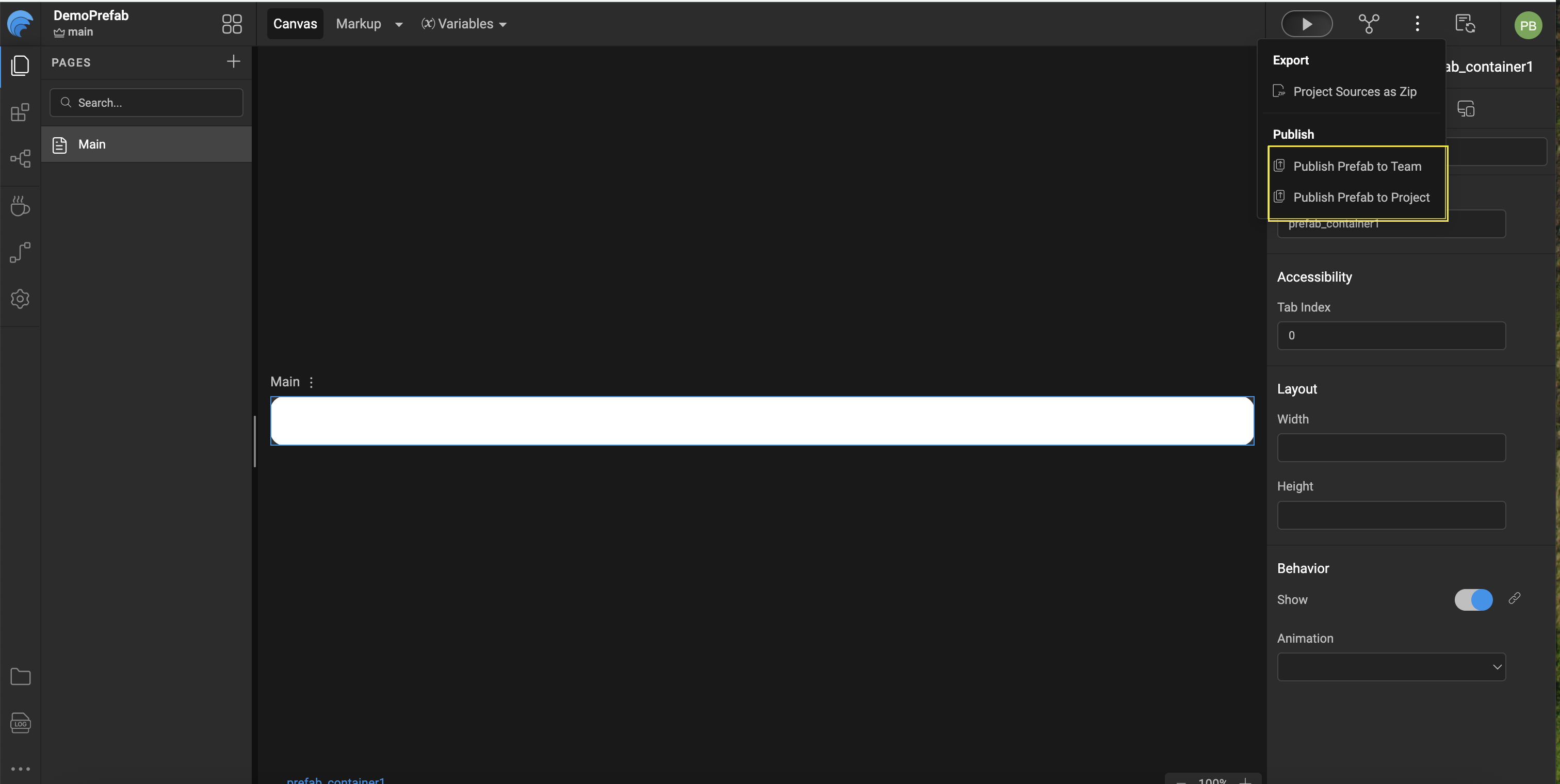
Publish Prefab to a Project
There are scenarios where a Prefab is intended for use only within a single project—such as during early development, testing enhancements, or validating changes before broader distribution. In such cases, you can choose to Publish Prefab to Project.
While publishing, select the target project from the available list. Once published, the Prefab becomes available in the Widget Panel under the Prefabs section, marked with a tag indicating that it is an unpublished Prefab.
Key Characteristics
- The Prefab is restricted to the selected project only.
- It is not accessible to other projects in the workspace.
- The Prefab does not appear in the Artifacts repository until it is published to a broader scope.
This approach provides a safe environment to experiment and iterate without affecting other applications.
Publish to Team (Enterprise)
Publishing a Prefab to a Team allows it to be shared across multiple projects within the same team, subject to administrator approval.
- The Prefab is added to the Artifacts repository.
- Team members can import and reuse the Prefab in their projects.
- Ensures controlled distribution while enabling collaboration.
Using a Published Prefab
Once a Prefab is published and imported into a project, it behaves like any standard WaveMaker widget:
- Drag and drop it onto application pages, dialogs, or containers.
- Configure its properties through the Properties Panel.
- Bind events and invoke exposed methods as needed.
This seamless integration allows Prefabs to be reused consistently while maintaining flexibility and control.
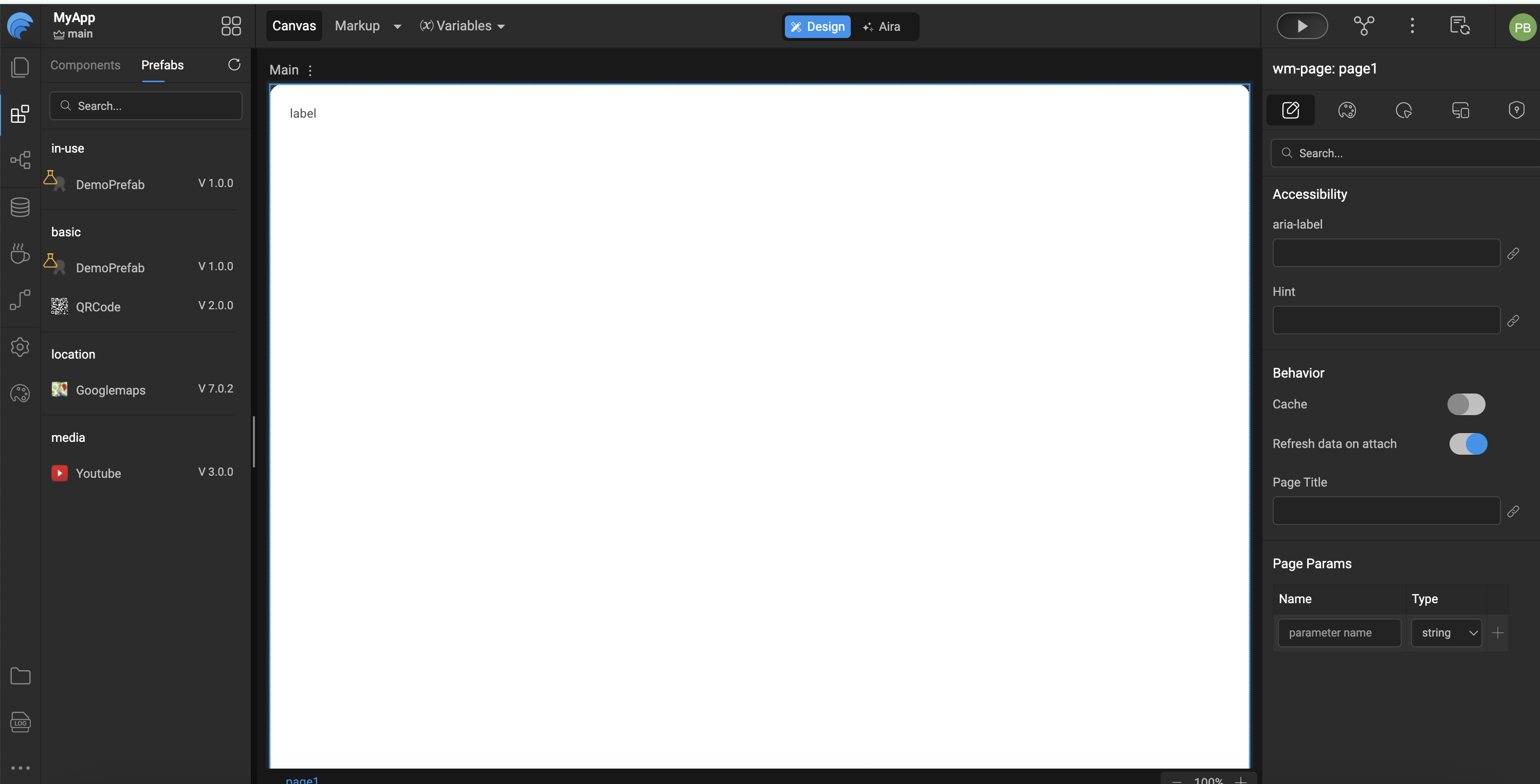
When a Prefab Appears as Unpublished
A Prefab may be shown as unpublished within a project under the following conditions:
- The Prefab is published directly to the project.
- A project ZIP is imported that references a Prefab not available in the current workspace.
- The Prefab has been removed from the Artifacts repository.
In all these cases, the Prefab remains usable within the project, but it must be republished to make it available for reuse in other projects.
Behavior for Previously Published Prefabs
If a Prefab has already been published and you open a project where it exists in a modified state:
- WaveMaker prompts you to choose one of the following:
- Revert to the published version
- Continue with the modified (unpublished) version
- Select Continue when you want to validate recent changes before publishing them more widely.
This ensures controlled testing while preserving the stability of shared Prefabs.
Updating a Prefab
When enhancing a Prefab with new functionality or fixes:
- Publish the updated Prefab with an incremented version number.
- Projects using the Prefab will be prompted to upgrade when opened.
- WaveMaker manages version conflicts by allowing developers to either proceed with the update or retain the existing version.
This versioning mechanism ensures stability while allowing continuous improvement of Prefabs without breaking dependent applications.
Summary
Packaging and publishing Prefabs in WaveMaker ensures they are easy to identify, test, share, and maintain. Developers can validate Prefab behavior using the built-in Preview, then publish Prefabs at the project, workspace, team, or enterprise level based on visibility needs. Versioned updates allow Prefabs to evolve safely while giving consuming projects control over when to adopt changes.