Test and Run (Preview) Applications
Once application design and development are complete, the next step is testing. The simplest and quickest way to test an application in WaveMaker is by using the Preview option available in WaveMaker Studio.
Previewing an Application
Clicking Preview launches the application on the WaveMaker server bundled with the Studio and generates a URL that can be accessed by users within the same network (for example, inside your network firewall).
Note: Preview mode is intended only for testing and evaluation purposes. Since the application runs on the WaveMaker Studio server, stopping the Studio or logging out will also stop the application.
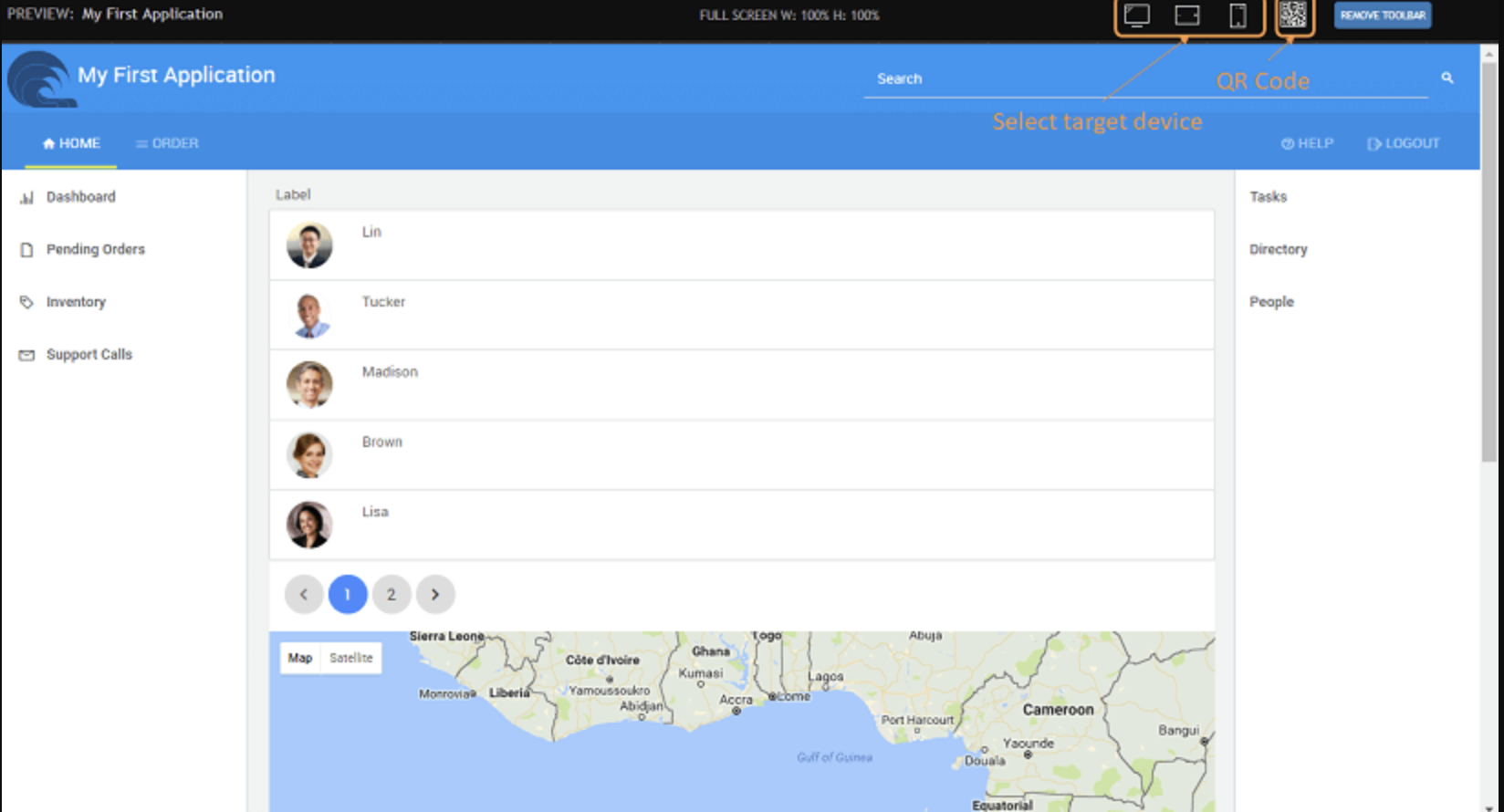
Key behaviors of Preview mode include:
- The application opens in a new browser window.
- The app loads the page from which the Preview button was triggered.
- If application security is enabled, users are prompted to log in and are redirected based on their assigned roles and permissions.
- A Preview Toolbar appears, allowing you to:
- Select different target devices (desktop, tablet, or mobile) to simulate responsive behavior.
- View the application layout across multiple screen sizes.
- Scan a QR code to open the app directly on a mobile device.
- The preview toolbar can be hidden if it is not required.
Application Runtime URL
When the application runs in Preview mode, it is accessed through a URL in the following format:
https://www.wavemakeronline.com/unique-id/app-name/login.html#/login
csharp Copy code
URL Components Explained
www.wavemakeronline.com– The WaveMaker Cloud domain where preview applications are hosted.unique-id– The application space identifier created during user registration. This value is unique per user.app-name– The name of the WaveMaker project. This can be customized by configuring the context root during deployment.login.html– The default entry point for applications with security enabled.- If security is disabled, this segment is omitted, and the URL appears as:
https://www.wavemakeronline.com/unique-id/app-name/#/Main
- If security is disabled, this segment is omitted, and the URL appears as:
Availability in Preview Mode
- The application remains accessible to other users as long as the project is open and running in WaveMaker Studio.
- Closing the project, logging out, or opening a different project in WaveMaker Studio automatically stops the currently running application.
- Preview deployments are temporary and are not intended for production or long-term use.