Overview
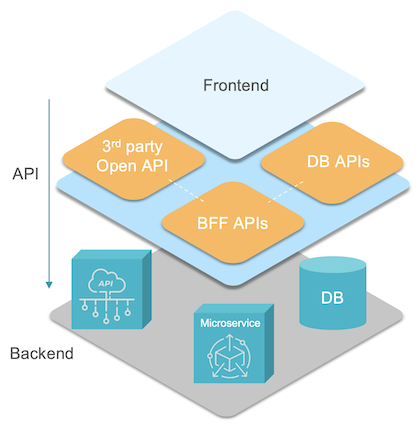
WaveMaker application backend is decoupled from the UI layer using well-defined REST API contracts. Developers are enabled to build their backend with the following capabilities:
- Import 3rd party REST APIs or Open API spec
- Create Backend-for-Frontend (BFF) or Experience APIs
- Create Mock APIs from Open API
- Auto generate database CRUD APIs by importing Schema (RDBMS)
- Create Spring or Java microservices
App backend is built on Spring and Java technology stack enabling Java developers to fully customize the backend services, allowing them to integrate with Spring developer ecosystem and libraries.
Import 3rd party REST API or Open API spec
Using Studio, developers can import 3rd party REST API or a collection of APIs through Open API spec. These APIs are made available to the UI layer by creating Variables for integration with components.
Variable enables configuration either to directly invoke 3rd party APIs from the UI layer or route the calls through a REST-proxy backend service. REST-proxy allows app-specific authorization or RBAC support for these API invocations.
Create Backend-for-Frontend (BFF) APIs
Create BFF or Experience APIs leveraging existing imported REST or Open APIs, by orchestrating them with custom business logic. API latency is a very critical factor for web and mobile application performance.
BFF or Experience APIs solves the following problems:
- Overfetching or underfetching of data
- Latency problems when data needs to be aggregated from multiple API calls
- Custom coding or exposed business logic on the client-side
- Security risks or token exposure
Create Mock APIs from Open API
Create Mock APIs from Open API Spec to de-couple frontend development from backend instability challenges, especially during early development phase. Frontend developers can build mock APIs, if the Open API spec is available and generate mock data automatically.
Auto generate Database APIs
Generate Database CRUD APIs by importing Schema (RDBMS) and WaveMaker generates the ORM persistence layer automatically. Developers can write SQL or HQL (Hibernate Query Language) queries and get their corresponding APIs generated. Platform provides additional APIs for search, filtering and exporting data.
Studio provides a workspace for working with Databases, for visualing the schema and their relationships, configuring RBAC for individual entities or fields and writing queries.
Create Microservices
Build custom microservices in Java and generate corresponding APIs for:
- Additional business logic
- Integrating with connectors for 3rd party systems like kafka, mongodb, EFK etc.
- Integrating with 3rd party libraries for authentication, logging, observability etc.
Related Documentation
- Architecture - Architectural patterns
- TechStack - Technology stack
- Security - Security practices
- Testing And Debugging - Testing strategies