Individual REST Endpoints
A WaveMaker provides a way to integrate REST API hosted separately, outside of a Swagger/OpenAPI definition as an individual REST endpoint. These REST services are lightweight, scalable services that expose resources over HTTP, allowing clients to interact using standard methods such as GET, POST, PUT, PATCH, and DELETE. These services typically return responses in JSON or XML formats.
WaveMaker enables developers to import such endpoints, configure request parameters and authorization, and consume them using variables, which can then be bound directly to UI components for seamless data display and interaction. This approach makes it easy to work with standalone APIs without requiring a formal API specification.
Importing a REST Service
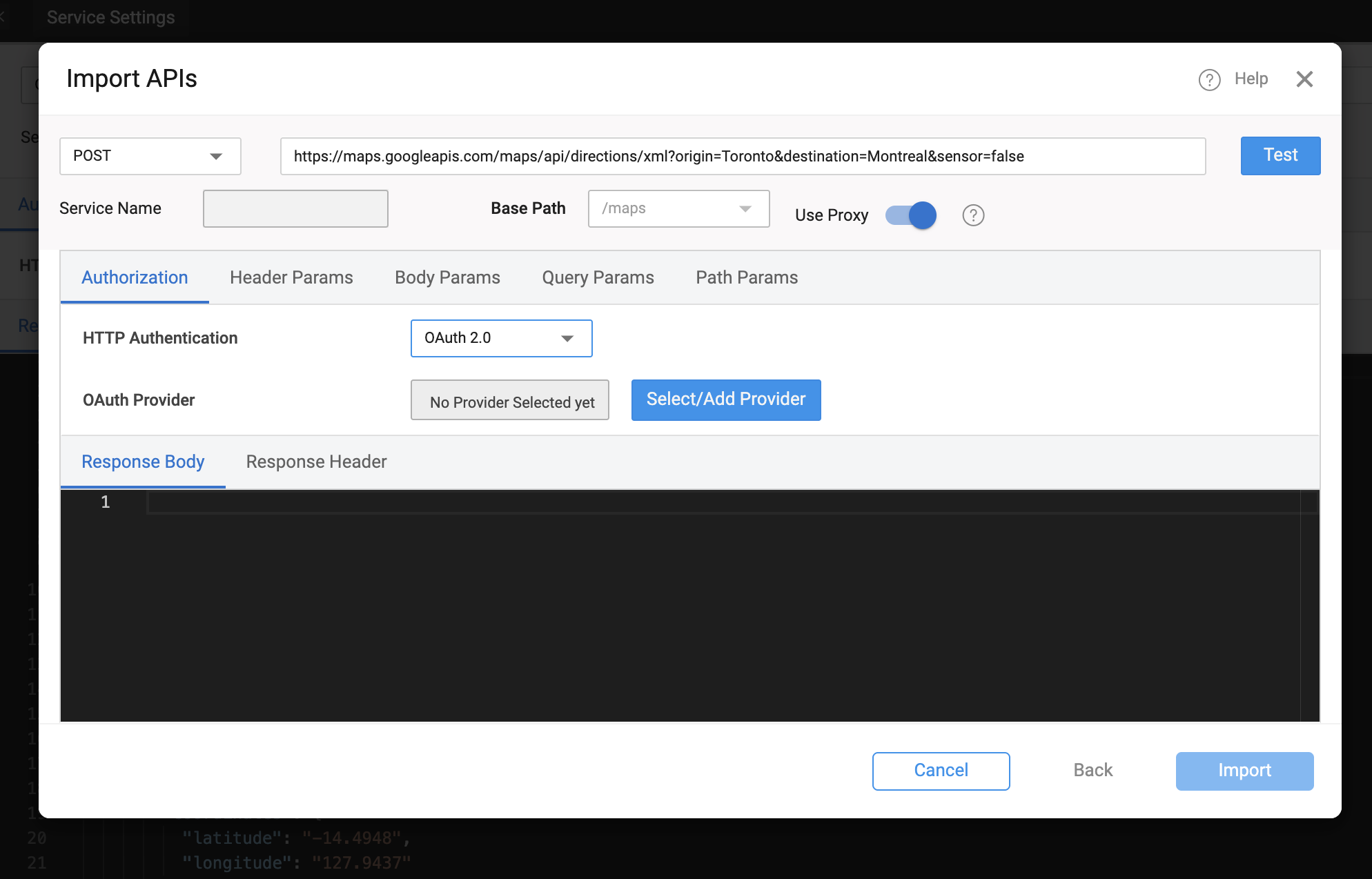
To integrate a third-party REST API into a WaveMaker application, developers start by creating a new REST service under Resources → Web Services in WaveMaker Studio. The service URL is specified along with the HTTP method (GET, POST, PUT, PATCH, DELETE, etc.), and any necessary proxy settings are configured to handle CORS or firewall restrictions for web apps. Mobile app calls are made directly, with proxy applied behind the scenes if needed during testing.
Authorization settings can be defined as required, including None, Basic (username/password), or OAuth 2.0, with the option to select or configure an OAuth provider. Developers can also define query, path, or header parameters to match the API signature. After configuring these details, the service can be tested to ensure it returns valid responses.
Once the test succeeds, the Import option becomes available, bringing the REST service into the project for use with variables and UI components.
Configuring REST Parameters
When setting up a REST service, you can configure several types of parameters:
- Query Parameters – Appended to the URL after
?, and separated using&. - Path Parameters – Specified directly within curly braces
{}in the URL. - Header Parameters – Configured via the headers section for additional metadata or auth tokens.
- Body Parameters – Used for methods that accept input (e.g., POST or PUT). For file uploads or mixed content, set the content type to
multipart/form-data, and specify parameter types such as File or Text.
These parameters automatically appear as input fields in the service variable definition and can be bound to UI elements or variables. For more understanding on configuring proxy, refer Proxy
Authentication and Security
WaveMaker supports different authentication models when configuring REST services:
- No Authentication — Default option when the service does not require credentials.
- Basic Authentication — Uses username and password.
- OAuth 2.0 — Allows integration with OAuth providers. You can select from pre-configured providers or define new ones during REST service configuration. For more details on OAuth 2.0
When securing REST calls, consider using App Environment Properties or Server Side Properties to store sensitive information such as API keys, tokens, or passwords. This ensures that sensitive values are not exposed in the UI or network calls. For more details refer Secure Server Side Properties.
Generated Backend Code
WaveMaker allows developers to import third-party APIs and automatically generate a complete backend, including Java classes, service logic, and design-time configurations. Built on proven enterprise frameworks, this approach simplifies API integration and customization.
This section describes the structure of a WaveMaker-generated service, using the Random User as an example.
Folder Structure
services/
├── authService/
├── hrdb/
├── MyJavaService/
└── randomuser/
    ├── designtime/
    │   ├── randomuser_API_REST_SERVICE.json
    │   ├── randomuser_apiTarget.json
    │   ├── randomuser_connection_settings.json
    │   └── service-info.json
    ├── src/
    │   └── com/
    │       └── myapp/
    │           └── randomuser/
    │               ├── model/
    │               └── service/
    │                   └── RandomuserService.java
    ├── conf/
    │   └── randomuser.properties
    └── servicedefs/
        └── randomuser-service-definitions.json
services/
- Root folder for all backend services in the project.
- Each subfolder represents a service, e.g.,
authService,hrdb,MyJavaService,randomuser.
randomuser/
Main folder for the randomuser service, containing both design-time configuration and generated backend code.
a. designtime/
Holds JSON configuration files used by WaveMaker at design-time (in Studio):
randomuser_API_REST_SERVICE.json– Defines API endpoints, request/response models, and mappings.randomuser_apiTarget.json– Contains target configuration for connecting to the API (base URLs, endpoints).randomuser_connection_settings.json– Stores connection/authentication settings for the API.service-info.json– Metadata about the service such as name, type, and version.
b. src/com/myapp/randomuser/
Java source code generated for the service:
model/– Java classes representing API data structures (request/response objects).service/– Service classes implementing logic to call the API.RandomuserService.java– Main service class handling API calls and integrating with business logic.
c. conf/
Configuration files for the service at runtime:
randomuser.properties– Holds runtime properties such as API endpoints and authentication tokens.
d. servicedefs/
Holds service definition JSONs used for WaveMaker Studio and deployment:
randomuser-service-definitions.json– Defines all available service methods, parameters, and data structures.
Key Points
- WaveMaker generates fully readable Java code in
src/. designtime/andservicedefs/are used internally by WaveMaker Studio for API integration and should not be deleted.- Properties in
conf/allow runtime customization without changing code. - The structure allows seamless integration of third-party APIs.
Application Configuration Properties
Whenever services are imported into WaveMaker, the platform automatically generates configuration properties that can be mapped to different environments such as Development, QA, or Production.
You can view and manage these properties in the Profiles.
For more information, refer to the Profiles section in the documentation.
For more details on environment-specific configurations, refer to the Profile Settings section.
Click to expand configuration properties
# ---------------------------
# REST API Configurations
# ---------------------------

## Random User API
rest.randomuser.basepath=
rest.randomuser.host=randomuser.me
rest.randomuser.scheme=https
Summary
REST Services in WaveMaker allow seamless integration of external HTTP APIs into your low-code application:
- Import REST services via the imported APIs.
- Configure URL, HTTP method, parameters, and authentication.
- Test endpoints before importing.
- Create service variables to invoke the API and bind responses to UI components.
- Use proxy configuration and environment properties to handle CORS and secure credentials.
How-To Guides
Learn more about working with REST services and web APIs through these practical guides:
- Using App Environment Properties - Configure environment-specific values for APIs
- Using POST Method to Send Data to REST API - Send data to external APIs
- Request and Response Processing for REST Services - Handle API request/response transformation
- Intercept Requests and Responses for API Calls - Add middleware logic to API calls
- Working with APIs with Different Pagination Formats - Handle various pagination strategies
- Adding UI for API with Server-Side Pagination - Implement paginated data displays
-Rest request timeouts - Rest request timeouts